HTML, CSS, and Responsive Web Design

WEB 110 Final Project

Project Overview

For my final project, I have chosen to present about HTML, CSS, and responsive web design. The purpose of the project is to explain the basics of how websites are structured and styled while demonstrating concepts learned throughout the course.

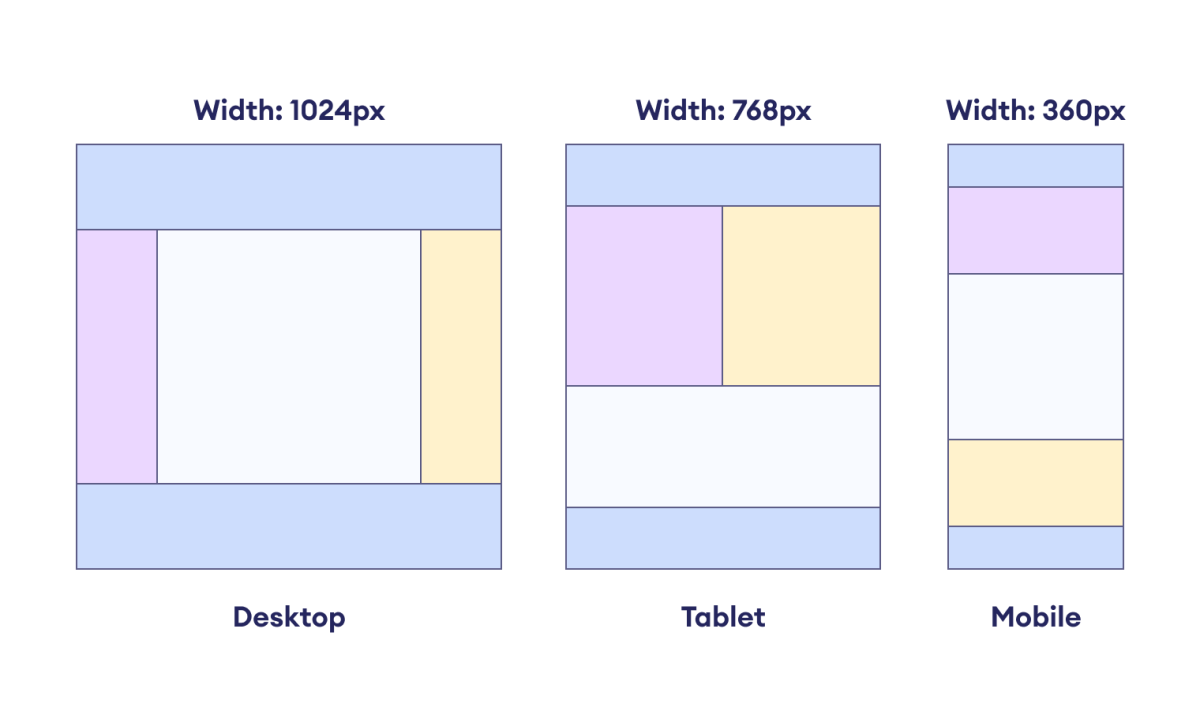
Image detailing how layout sizes can vary based on what device you are using.

Presentation Topics

HTML Structure

HTML creates a web page's structure by using tags to wrap and label content, telling the browser how to organize and display different types of information. HTML is basically the skeleton of the page; it defines where headings, paragraphs, and images go without handling how they look, which is the job of CSS.

CSS Styling

CSS, or Cascading Style Sheets, controls a web page's appearance by applying a set of rules to HTML elements, effectively separating a site's structure from its visual presentation. While HTML builds the structure of a website, CSS acts as the visual design layer, determining everything from color schemes to complex layouts.

Responsive Design

Responsive web design is crucial because it ensures a single website delivers an optimal, accessible experience across all devices. Instead of building separate sites for different devices, responsive design saves time and improves usability by offering flexible content that works on different screen sizes.
Good Web Design Principles

  • Use clear navigation so users can move through a website easily.
  • Maintain consistent colors and fonts for a professional appearance.
  • Design responsive layouts that work on desktop, tablet, and mobile devices.
  • Use readable text, spacing, and accessibility features for all users.

Why is Accesibility Important?

Click on this link to be directed to Youtube to learn more!

What I Learned

While planning this project, I learned that creating a website or multimedia presentation requires organization before the final product is built. It is important to plan the structure, topics, visuals, and purpose of the project ahead of time so the final presentation is clear and professional. I can apply this learning to future web design, UX design, and product design projects because planning helps make digital work easier to complete and easier for users to understand.